Two RTX 4090s and an NVIDIA DGX Spark (GB10) scheduled by SLURM — mixed x86 and arm64 partitions, cgroup-isolated GPUs, accounting — with JupyterHub profiles for interactive work and shared datasets, models and environments over NFS.
03 / The collection
The lab.
An always-on lab for machine-learning experiments, self-hosted services, and infrastructure testing — and the lessons learned the interesting way.
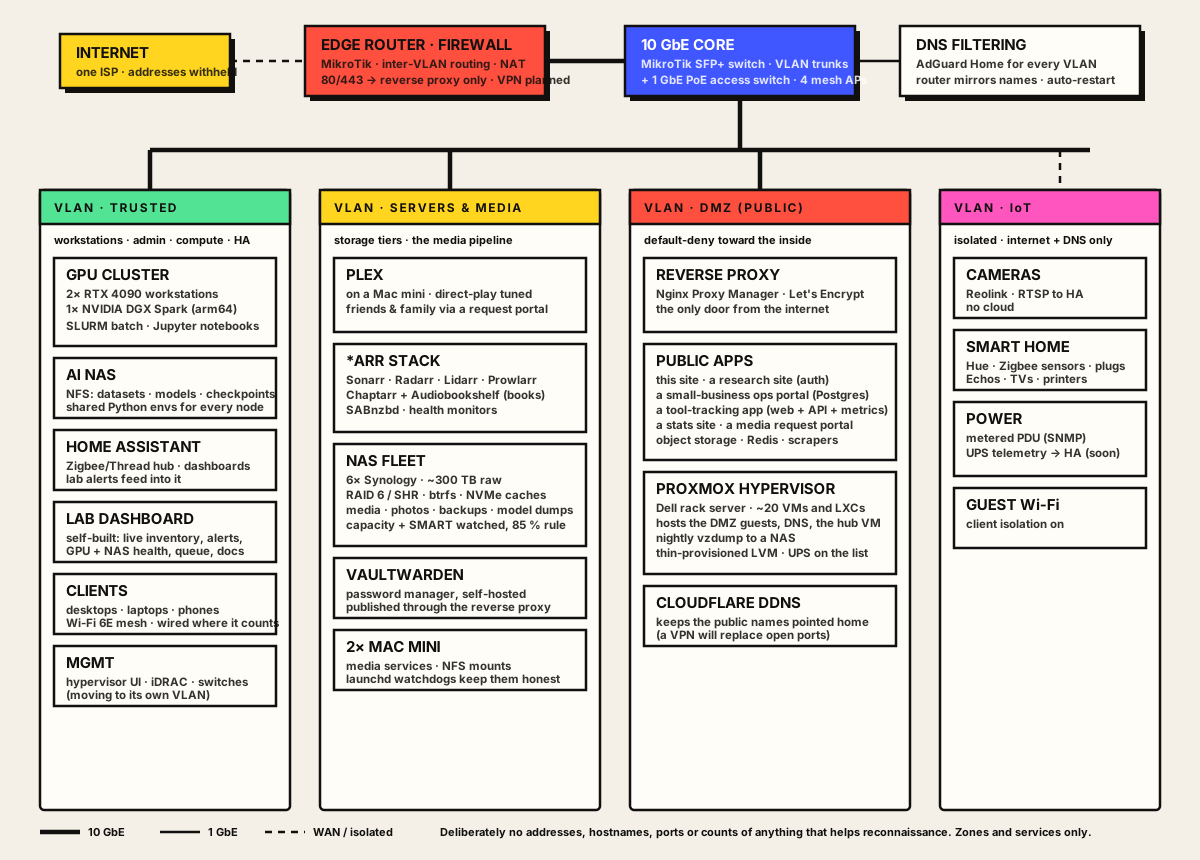
A map, minus the useful details.
This communicates the shape of the work without publishing real addressing, hostnames, management paths, exposed ports, or a convenient reconnaissance document.
The actual shape of it.
Zones and services, the way home-labbers share these. Still no addresses, hostnames or port lists — those live in a private inventory that renders as a live dashboard inside the network.
What the lab says indirectly.
The point is not the number of machines. It is the ongoing practice of designing boundaries, operating services, noticing failure modes, and leaving the system easier to understand than you found it.
Proxmox on rack-mounted Dell hardware running about twenty guests: DNS filtering, a reverse-proxy front door, Home Assistant integrations, media automation, this site. Six Synology NAS units for the storage tiers.
MikroTik routing and switching, VLANs by trust level, a DMZ for public services behind a single reverse proxy, DNS-level ad blocking — all described in a plain-text inventory that a self-built site renders live, with ping sweeps, lease discovery and alerts.
Nightly backups, per-host health agents, GPU power caps, a maintenance calendar with due dates, and periodic outside reviews of the design. Small, but treated like production — because the experiments depend on it.
Public doors.
Only list services meant to be public. Management interfaces, internal dashboards, real host inventories, and private endpoints do not need a place on this page.
Document the lesson, not the secret.
Sanitized diagrams, postmortems without identifiers, patterns you reused, and hard-earned troubleshooting notes make excellent portfolio material.